Idiosyncrasies of the instruction set Before you start programming the PIC in assembler, have a thorough read of the datasheet and pay attention to what the instructions do. The instruction mnemonics can be misleading and some instructions don't set flags you'd expect them to. Anyway, here's my 'top ten tips' for the PIC 14-bit instruction set as found on the 12F and 16F PICs
MPASM Pseudo Mnemonics The Microchip MPASM (MPLAB IDE) assembler supports a number of Pseudo Mnemonics. These are just text substitutions for regular PIC instructions but they can make code written using them much more readable and easy to follow. For example the regular instruction BCF STATUS,C will clear the carry flag in the status register. The pseudo mnemonic CLRC does the same thing but it's much easier to 'see' what is being done. A full list of these can be found here: Pseudo Mnemonics List
See also the Microchip MPASM Quick Reference Card
Since subtraction isn't commutative it
matters what is being subtracted from what.
There is no subtract-with-carry instruction in the PIC 12/14 bit instructions set. The current state of the carry flag is ignored by the subtract instruction, so you don't have to clear/set it before a subtract instruction executes. However that also means if you are going to do a multi-word subtract operation your code will have to manually test and handle the carry. Below is some code that shows how the subtract instruction works:
movlw
5 Compare and branch The PIC instruction set doesn't have much in the way of compare and branch instructions. The following code will compare a File register with the contents of W and then do a test and branch.
How to Decrement the W Register The PIC doesn't have a decrement W instruction but you can achieve the same thing with this single instruction. This is straight from the Microchip data sheets. The workings of this may not be immediately apparent. The Add and Subtract instructions on the PIC use 2's Complement representation. What this instruction is actually doing is adding the W register to -1 which results in W containing one less than it started with.
Don't forget that the 'addlw' instruction will always affect the zero, carry and digit carry flags, where the 'decf' instruction only affects the zero flag. How to Increment or Decrement a register without affecting any flags The incf and decf instructions set/clear the 'Z'ero flag in the status register. However, the incfsz and decfsz instructions don't affect any flags. So while this will affect the 'Z'ero flag
this will not
Okay, so you have to waste one program memory word with the 'nop' instruction, but if you happen to need to increment or decrement a register without changing the Z flag in the status register it can be a quite useful. Test W register for 0 and clear Carry and Digit Carry in one instruction This may seem an obscure thing to want to do but I have used this in a practical application which is how I came across it. When you use a RETLW instruction to load W, the Status register zero flag isn't affected. In my application I was using a lookup table with return data of 0x00 as an end of data delimiter so I needed to test W for a zero value and also needed to clear the carry bit for a shift instruction that followed. Method 1.
Method 2.
This code block exchanges the contents of two file registers using the W register. The smart thing about this code is that it doesn't require the use of a temporary file register to store an intermediate value
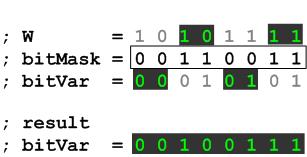
I take no credit for this but it's pretty neat in its workings and can be very useful. Copy specific bits from W register into GPR variable This code copies the bits in the W register specified by the bitMask into the bitVar variable while leaving the remaining bits in the bitVar variable unchanged. ; define bit mask
constant to suit application
; enter code block with
8 bit unsigned window comparison This function compares the value in the Wreg with a high and low watermark. It returns with the carry flag set if minimum <= Wreg <= maximum. If Wreg is outside these values it returns with the carry flag clear. ; Unsigned 8
bit Window comparaison
Input edge detection is useful for finding when an input changes state. A practical application is detecting when a switch has been pressed or released. Implementing a function that can detect either a rising or falling edge is fairly straight forward. The method used is to first Exclusive-OR (XOR) the previous tested state of the input with the current state and then perform a logical AND with either the current state if you want to find a rising edge, or the previous state for a falling edge. The current state then becomes the previous state in the next pass. If you want to find both rising and falling edges, you need to do the XOR but not the following AND. This code doesn't need to see the actual edge but it will detect when an input has changed state. It also needs to poll the input fast enough so as not to miss a signal that changes state and back again faster than the polling cycle. Typically when a user presses a switch it will take several 100mS even if they press it quickly so polling fast enough is quite easy. When using it with switches you need to allow for switch bounce, this is were the contacts in the switch make and break several times before settling. A microprocessor is more than fast enough to see several 'edges' from the switch bounce; therefore the application needs to allow for this. This can often be done by simply using a hold down timer to ignore further edges seen during the hold down period. The code below detects low-to-high
(rising edge) transitions on PORTB inputs 4-7 and pulses outputs 0-3 high when an edge
is seen (in 4 -> out 0 | in 5 -> out 1 | in 6 -> out 2 | in 7
-> out 3). ; define bit mask C.input_mask equ b'11110000' ; Detect input bits that change from 0 to 1 - rising edge
;
edge.rise movfw PORTB ; load PORTB to Wreg
andlw C.input_mask ; mask out I/O bits we're not interested in
movwf inputs.this_time ; save result to variable
xorwf inputs.last_time,W ; XOR last input value with current input value
andwf inputs.this_time,W ; keep only bits that have changed from 0 to 1
movwf edge.detected ; save result to variable
                movfw           inputs.this_time                ; copy input.this_time to input.last_time
                movwf           inputs.last_time                ; ready for next pass
call output ; for purpose of the demo, send result to outputs goto edge.rise ; run edge detect code loop again ; Write edge detect to output
; This code is just to show the edge detecion in the simulator.
; In your own code you'll want to do something useful with the edge.detected variable
output         swapf           edge.detected,W                  ; since we use 4 bits as input and 4 as output on
               movwf           PORTB                            ; the same port, swap nibbles and write to PORTB
               return
A demo app written in assembler for the PIC16F628A along with the HEX files for the rising and falling edge demos which can be run
on the Oshonsoft PIC
Simulator are provided below. The app was written to run on
the simulator which doesn't run in real time. If you try this on a
real PIC with LEDs and switches, you won't be able to see anything
because the output LED pulses are to fast.
First, this is a bad programming example, it's perfectly correct as far as the CPU is concerned but it will make the execution of your code difficult to follow, and more difficult to maintain. With that out of the way, if your code calls a sub-function from within another call, you can save a byte and 2 cycles by using a 'goto' instruction to get to the sub-function and letting the 'return' in the sub-function take you back to the original call. Since the stack on the 12/14 bit PICs is
only 8 levels deep, in some circumstances this trick can 'gain' you a 9th
call, and it will save two instruction cycles.
; 8 x 8 unsigned multiply routine. ; enter with terms to multiply in mult1, mult2 ; resHi, ResLo contain 16 bit result on exit ; value in mult2 will is destroyed _multiply8x8 movfw mult1 ; load mult1 into W reg clrf resHi ; initialise resHi, ResLo clrf resLo bsf resLo,7 ; set bit 7 in resLo to use as loop counter _mloop rrf mult2,F ; rotate mult2 one bit right skpnc ; test bit shifted out of mult2 addwf resHi,F ; if it was a 1, add W to ResHi rrf resHi,F ; shift 16 bit result right one bit rrf resLo,F ; skpc ; skip next if carry set as we have shifted 8 times goto _mloop ; if carry was not set, loop again return Binary to packed BCD conversion (If you use this code, please reference http://picprojects.org in your source code, thanks) This code converts a binary number to a packed BCD number using the shift and add +3 algorithm. If you want to know how it works there are plenty of sites that offer explanations. See here. There are two versions of the code; an 8 bit conversion and a 16 bit. If you only need to convert a single byte (8 bit number) the 8 bit version is much faster. The binary number to convert is loaded in
to binH and binL prior to calling the subroutine. The result is
placed in bcdH, bcdM, bcdL. The routine requires two other
working file register variables. The 8-bit conversion requires the
binary value to convert in bin and the results is returned in bcdH, bcdL.
In both versions the contents of binH and binL or bin are destroyed.
binL
;binary number
for conversion - low byte
Waste four instruction cycles with one instruction If you need to waste some cycles in a delay routine you can take advantage of the fact that whenever the PC (program counter) has to be reloaded it takes two instruction cycles. Since you are almost always sure to have a RETURN instruction somewhere in your code, give it a label. Then use a call to go there and back, one instruction, four cycles. If you really have no return anywhere in the code then you need to put one in just for this and it's a two instruction solution. The only thing to watch for is that the stack on the PIC is only 8 levels deep so if you are deep nesting calls make sure this doesn't wipe the top of the stack out.
This routine is based on a hardware parity checker I made about 15 years ago using a couple of 74LS86 quad XOR gate for a memory circuit. Logic function equivalent schematic.
Quick Reference Guide If you use Microchip's MPASM assembler you can use their Pseudo Instruction Mnemonics when writing code which may help to make your code more readable both for others and yourself. I certainly find it to be the case and use them all the time. See table of Pseudo Instructions You can download the 8 page MPASM / MPLINKPICmicro MCU Quick Chart from the Microchip website It's quite a useful document with references for the standard PIC micro instructions, assembler directives and the pseudo instructions. Links to
Microchip Application Notes
AN234
Hardware Techniques for PIC Microcontrollers
|
||||||||||||||||||||||||||||||||||||||